
Introduction
To enable Jumbo packets on server core is not as straight forward as a "full fat" version of windows. It just needs a little powershell know how.Resolution
The first step is to ensure at the VMware level you are using a "VMXNET 3" adapter. The next step is to ensure the machine is set to use jumbo packets at the virtual nic level using:
netsh interface ipv4 show interfacesand also possibly the ipv6 version of the command if you have ipv6 configured
netsh interface ipv6 show interfacesOnce confirmed, set the MTU using:
netsh interface ipv4 set subinterface "15" mtu=9000 store=persistent
netsh interface ipv6 set subinterface "15" mtu=9000 store=persistent
Once completed you will see the following info to replace the standard 1500 MTU size:
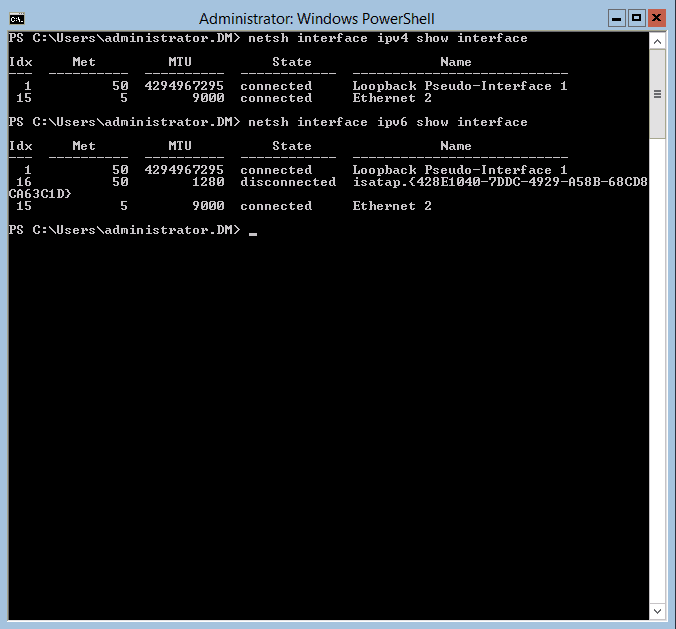 The final step is to ensure the adapter is set to accept jumbo frames on the interface:
Set-NetAdapterAdvancedProperty -Name "Ethernet 2" -DisplayName "Jumbo Packet" -RegistryValue "9014"
Get-NetAdapterAdvancedProperty
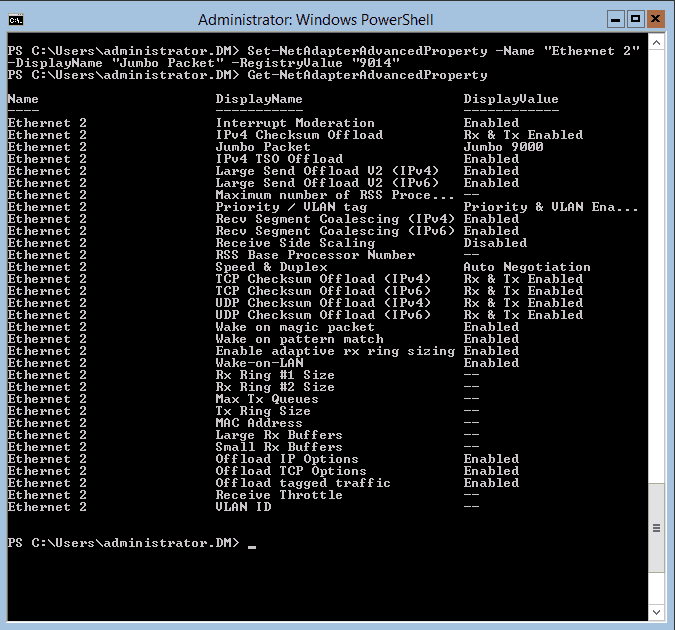 Easy when you know how.
Leave a comment
Your email address will not be published. Comments are moderated before appearing. We retain your IP address for up to 90 days for moderation, then remove it.