
Introduction
The problem I was having was as follows. 3 Juniper devices in a hub and spoke topology, 1 HQ and 2 Branch. The 2 Branch firewalls were actually just basically identical configs in one branch on separate DSL lines. What was required was changing the IP of the firewall and getting the VPN up and running to allow the branch access. The problem I was having was that the tunnel was inactive and needed to re-initiate.Solution:
Once the peer gateway IP addresses had been amended as required. The next option required was as follows:Via the WebUI:
Go to VPN > AutoKey IKE > Edit Select the VPN monitor and Rekey option on the firewall: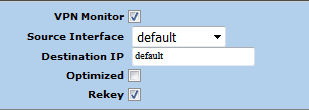
Via the CLI:
set vpn <vpn name/ Phase2 Name> monitor <optimized> rekeyOptimized is optional. Source Doc: http://kb.juniper.net/InfoCenter/index?page=content&id=KB6121&actp=search
Leave a comment
Your email address will not be published. Comments are moderated before appearing. We retain your IP address for up to 90 days for moderation, then remove it.